内容目录
本文大部分内容来源于此链接的文章 ef="https://www.cnblogs.com/qinchao0317/p/10699717.html”>)
,我对部分内容做了一些改动,方便自己日后复习,若有侵权,请联系我,我会将此文删除,谢谢)
话说在看上面链接的文章时,并没有将所有知识学习到位,略过了部分内容,算是偷懒吧,因为看的确实烦。这篇文章(笔记)对 Python 的格式化输出的讲解并不完整,不过以后再遇到此类知识时,先看这篇文章,若未找到需要的内容后,再重新百度就好。
1 %用法
1.1 整数的输出
%o:oct 八进制
%d:dec 十进制
%x:hex 十六进制

>>> print('%o' % 20)
24
>>> print('%d' % 20)
20
>>> print('%x' % 20)
14
1.2 浮点数输出
%f:保留小数点后面六位有效数字
%.3f:保留小数点后面三位有效数字

%e:保留小数点后面六位有效数字,使用科学计数法
%.3e:保留小数点后面三位有效数字,使用科学计数法

>>> print('%f' % 1.11) # 默认保留 6 位小数
1.110000
>>> print('%.1f' % 1.11) # 保留 1 位
1.1
>>> print('%e' % 100.01) # 默认保留 6 位小数,用科学计数法
1.000100e+02
>>> print('%.3e' % 100.01) # 保留 3 位小数,用科学计数法
1.000e+02
1.3 字符串输出
%s:默认的字符串输出格式
%10s:右对齐,占位符 10 位
%-10s:左对齐,占位符 10 位
%.2s:截取 2 位字符串
%10.2s:10 位占位符,截取 2 位字符串

>>> print('%s' % 'Hello World')
Hello World
>>> print('%20s' % 'Hello World') # 右对齐,取 20 位,不够的话以空格补位
         Hello World
>>> print('%-20s' % 'Hello World') # 左对齐,取 20 位,不够的话以空格补位
Hello World
>>> print('%.2s' % 'Hello World') # 从左到右截取两位字符串
He
>>> print('%10.2s' % 'Hello World') # 右对齐,占位符 10 位,从左到右截取 2 位字符串
        He
>>> print('%-10.2s' % 'Hello World') # 左对齐,占位符 10 位,从左到右截取 2 位字符串
He
1.4 其他
字符串格式代码
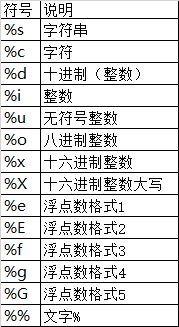
常用转义字符

2 format
相比于%,format()功能更强大。format()函数将字符串当成一个模板,通过传入的参数进行格式化,使用{}作为特殊字符来代替%。
2.1 位置匹配
不带编号,即"{}"
带数字编号,可调换顺序,如,"{1}"、"{2}"
带关键字,如"{name}"、"{age}"
>>> print('{} {}'.format('Hello', 'world'))
Hello world
>>> print('{0} {1}'.format('Hello', 'world')) # 带数字编号
Hello world
>>> print('{0} {1} -- {1} {0}'.format('Hello', 'world')) # 打乱
Hello world -- world Hello
>>> print('{name} {age} {sex}'.format(name='xw', age='23', sex='male')) # 使用关键字
xw 23 male
2.2 格式转换
‘b’ – 二进制。将数字以 2 为基数进行输出。
‘c’ – 字符。在打印之前将整数转换成对应的 Unicode 字符串。
‘d’ – 十进制整数。将数字以 10 为基数进行输出。
‘o’ – 八进制。将数字以 8 为基数进行输出。
‘x’ – 十六进制。将数字以 16 为基数进行输出,9 以上的位数用小写字母。
‘e’ – 幂符号。用科学计数法打印数字。用’e’表示幂。
>>> print('{:b}'.format(5))
101
>>> print('{:c}'.format(65))
A
>>> print('{:d}'.format(20))
20
>>> print('{:o}'.format(20))
24
>>> print('{:x}'.format(20))
14
>>> print('{:e}'.format(20))
2.000000e+01
2.3 进阶
进制转换
>>> "int:{0:d}, hex:{0:x}, oct:{0:o}, bin:{0:b}".format(42)
'int:42, hex:2a, oct:52, bin:101010'
>>> "int:{0:d}, hex:{0:#x}, oct:{0:#o}, bin:{0:#b}".format(42) # 若进制前有#号,则输出带进制前缀
'int:42, hex:0x2a, oct:0o52, bin:0b101010'
左中右对齐及位数补全
<是左对齐(默认状态就是左对齐),>是右对齐,^是居中。
>>> print('{} and {}'.format('hello', 'world')) # 默认左对齐
hello and world
>>> print('{:10s} and {:>10s}'.format('hello', 'world')) # 第一个取 10 位左对齐,第二个取十位右对齐
hello and world
>>> print('{:^10s} and {:^10s}'.format('hello', 'world')) # 两个位置均取长 10 位且居中对齐
hello and world
>>> print('{} is {:.2f}'.format(1.123, 1.123)) # 第二个位置取 2 位小数
1.123 is 1.12
>>> print('{0} is {0:>10.2f}'.format(1.123)) # 第二个位置取 10 位,2 位为小数,右对齐
1.123 is 1.12
>>>
>>>
>>> '{:<30s}'.format('left aligned') # 左对齐,30 位长度 'left aligned ' >>> '{:>30s}'.format('right aligned') # 右对齐,30 位长度
' right aligned'
>>> '{:^30s}'.format('centerd') # 居中
' centerd '
>>> '{:*^30}'.format('centerd') # 居中,空白处用*填充
'***********centerd************'
正负符号显示
>>> '{:+f} {:+f}'.format(3.14, -3.14) # 总是显示正负号
'+3.140000 -3.140000'
>>> '{: f} {: f}'.format(3.14, -3.14) # 若是正数,则在前面留一个空格;若为负数,则显示负号即可
' 3.140000 -3.140000'
>>> '{:-f} {:-f}'.format(3.14, -3.14) # 若为负数,则显示负号;若为正数,则不显示正号。简单说来,与'{:f} {:f}'一致
'3.140000 -3.140000'
百分数
>>> '{:.2%}'.format(0.981) # 以百分数表示,数字部分的小数点后保留 2 位
'98.10%'
2.4 format 的用法变形
直接上代码
>>> '{0} {1}'.format('hello', 'world') # 普通用法
'hello world'

>>> a = 'hello'
>>> b = 'world'
>>> f'{a} {b}' # f'...',可在字符串前加‘f’符号,以达到格式化的目的,在{}里加入对象,这种为 format 的另一种形式
'hello world'

>>> name = 'xw'
>>> age = 23
>>> sex = 'man'
>>> salary = 1234
>>> print(f'My name is {name.capitalize()}.') # 将名字大写
My name is Xw.
>>> print(f'I am {age:*^10} years old.') # 居中,共占 10 个字符,空白处用*填充
I am ****23**** years old.
>>> print(f'I am a {sex}')
I am a man
>>> print(f'My salary is {salary:10.3f}') # 共占 10 个字符,小数点后面保留三位
My salary is 1234.000
上一页相关文章
相关文章
- 【Python】修改Windows中 pip 的缓存位置与删除 pip 缓存(1)
- 记录问题解决的连接(0)
- 解决python中TypeError: not enough arguments for format string(0)
- ‘%s=%s’ % (k, v) for k, v in params.items(), ^ SyntaxError: Generator expression must be parent(0)
- python pycharm如何全局(整个项目中)搜索指定代码?(CTRL+SHIFT+F)全局字符串搜索(0)
- 【Python】修改Windows中 pip 的缓存位置与删除 pip 缓存(1)
- 记录问题解决的连接(0)
- 解决python中TypeError: not enough arguments for format string(0)
- ‘%s=%s’ % (k, v) for k, v in params.items(), ^ SyntaxError: Generator expression must be parent(0)
- python pycharm如何全局(整个项目中)搜索指定代码?(CTRL+SHIFT+F)全局字符串搜索(0)